Key takeaway
Buying a website is buying a small business that happens to live online. The price is mostly a multiple of the profit it earns, so the work is in proving that the profit is real, understanding where the visitors come from, and making sure the site can keep earning once the seller leaves. This guide walks a first-time buyer through each step in order. For the wider picture across site types, see our guide to buying a business online.
Figures here are examples built from VALUERAQ's published default assumptions. They are estimates, not records of real sales.
Buy or build: which fits you?
Many first-time buyers ask whether to buy a site or start one. Neither is cheaper in every case. The table compares what you give up in each.
| Buy an existing website | Build a new one | |
|---|---|---|
| Money | Paid up front, priced on profit | Mostly your time, plus tools and content |
| Time to first income | Starts on day one if the income is real | Often months or longer before income, and it may never come |
| Main risk | Overpaying, or income that is not what it seemed | Spending months on a site that earns little |
| What you learn | A working example to study and improve | Everything from scratch |
| Best for | Buyers with capital who can check numbers | Buyers with more time than money |
Buying is the better fit when you would rather pay to skip the early months and can prove what you are paying for. See also buy vs build a SaaS business for the software version of the question.
Step 1: Set your budget and your limits
Start with three questions before you look at a single listing.
- How much can you spend, including costs after the purchase? Keep money back for an escrow fee, professional advice, and fixes or content in the first months.
- How many hours a week can you give it? A site that needs 30 hours a week is a job, not a side project.
- What can you already do? Writing, search optimization, selling, basic web work. Buy a site where you can do the main work yourself or can afford to pay someone to.
A clear budget also keeps you from stretching for a site that looks cheap because it carries a hidden problem.
Step 2: Choose the type of site
Most websites for sale fall into a few groups.
| Type | How it earns | What to watch |
|---|---|---|
| Content or affiliate site | Ads and commissions from recommended products | Depends on search traffic and on affiliate program rules |
| Ad-funded site | Display ads shown to visitors | Falls quickly if traffic falls |
| Lead-generation site | Fees for passing enquiries to businesses | Depends on a few buyers of the leads |
| Small online store | Sales of products | Needs stock, suppliers and customer service |
| Service or niche site | Paid work or memberships | Often depends on the owner's skills |
If you are new, a content site with steady traffic and several income sources is simpler to take over than a store with suppliers and stock. If you prefer software income, read how to buy a SaaS business instead.
Step 3: Find websites for sale
You can look in several places: marketplaces, brokers, and direct approaches to site owners. VALUERAQ lets you browse websites for sale and message sellers privately. Each listing is reviewed before it goes live. Joining and browsing are free, and the fees page explains what applies to sellers; see fees.
Whichever source you use, read the listing as a buyer, not a fan. A good listing states what the site does, its revenue and costs, its traffic sources, how many hours it takes and what is included. If a listing is vague about money or where visitors come from, ask before you get attached to it.
Step 4: Screen listings quickly
Before you spend time on any site, check four things from the listing alone.
- Age. A site that has earned for years has had time to show how it behaves through good and bad months.
- Trend. Look at 12 months or more of revenue. A falling line needs an explanation.
- Concentration. One page, one keyword, one affiliate program or one buyer providing most of the income is a risk. Ask for the share each one contributes.
- Owner hours. Ask exactly what the owner does each week, and whether you could do it.
Drop listings that fail early. You are not being fussy; most of the time, most of the sites you see will not be right.
Step 5: Value the site
Small websites are usually priced on yearly profit, adjusted for the owner's own pay. The standard measure is SDE (seller's discretionary earnings), which adds back the owner's salary and one-off costs so you can see what the site earns for an owner-operator. A market-wide rule of thumb does not exist; every multiple is a range. The website valuation guide explains how each factor moves it.
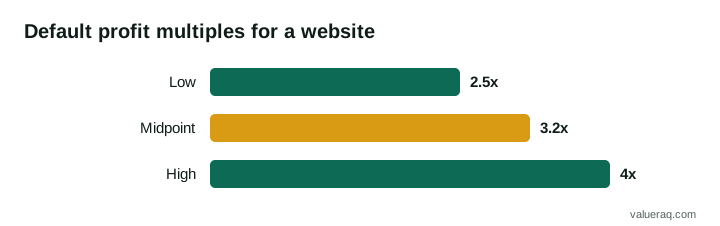
VALUERAQ's default range for a website is 2.5 to 4.0 times yearly profit, with 3.2 as the midpoint. Traffic quality, revenue trend, age, owner hours and dependence on one channel then move the result up or down. The range is a published platform assumption, not a market average, and the reasoning is in the methodology.
A worked example
A content website earns $5,000 a month in profit after all costs, before paying the owner.
- Yearly profit: $5,000 × 12 = $60,000.
- At 2.5 times: $60,000 × 2.5 = $150,000.
- At 3.2 times: $60,000 × 3.2 = $192,000.
- At 4.0 times: $60,000 × 4.0 = $240,000.
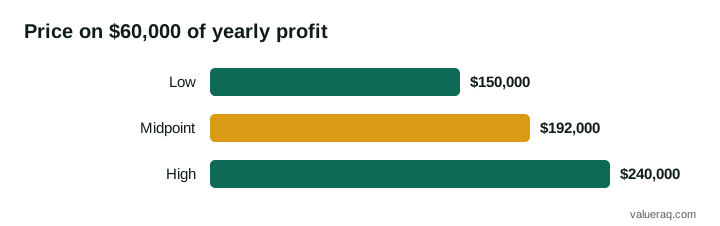
Which end applies depends on the site. Steady traffic from several sources and a short list of owner tasks point to the upper half. A falling trend or one source of visitors points to the lower half. Enter the seller's figures into the Website Valuation Tool to see the range and the reason for it.
Multiples have limits. Corporate Finance Institute notes that a multiples approach "only considers the company's position for a certain time period," so one figure is a starting point. Compare it with the asking price and with what the profit really is after your own corrections.
What a budget buys
Turn a budget into the profit you need to see. This uses VALUERAQ's default midpoint of 3.2 times yearly profit, so it shows the idea, not a market price.
| Budget | Yearly profit it points to (budget ÷ 3.2) | Per month |
|---|---|---|
| $5,000 | $1,563 | about $130 |
| $50,000 | $15,625 | about $1,302 |
| $500,000 | $156,250 | about $13,021 |
A $5,000 budget points to a site earning about $130 a month, which usually means a very small or very young site. A $500,000 budget points to a site earning about $13,000 a month, which usually needs a team or a long record. Use the table in reverse: if a seller asks $50,000 for a site earning $500 a month, the price is far above the default range and you need a strong reason to pay it.
Step 6: Check the numbers at the source
This is the step that protects your money. Do not rely on screenshots, which can be edited.
- Revenue. Ask for read-only access to the ad, affiliate or payment dashboards, and match the totals to the seller's bank deposits. Our guide on how to verify website revenue shows how.
- Traffic. Ask for read-only access to the analytics and search tools, and check that visits are steady and come from real sources. See how to verify website traffic.
- Costs. Ask for the hosting, software, writer and tool bills, and check for costs the seller has left out.
- Add-backs. BizBuySell warns that "some add-backs can unrealistically overvalue the company." Ask for evidence for every cost the seller wants to remove.
- Ownership. Confirm the seller owns the domain, the content and the images, and has the right to transfer the revenue accounts. Some ad and affiliate programs do not allow accounts to pass to a new owner, so find out before you pay.
Quick background checks before you go deeper
These take minutes and filter out weak listings. They do not replace the checks above.
- Who owns the domain. Look the domain up in a WHOIS tool. The registrant, or the registrar account the seller shows you, should match the person selling. Many owners hide their name, so the seller can also prove control by changing a setting you can see.
- How old the site really is. The Internet Archive's Wayback Machine shows earlier versions of a page. Check that the site looked the same a year ago as the seller says, and that it was not a different site on the same domain.
- Backlinks. Ask the seller for a backlink report from a tool they pay for, or run a free one. Look for many links from the same few places, or from sites that look made for linking.
- Search visibility. Search the site's name and a few of its main topics. Is it there?
The full list of questions is in the due diligence checklist. The U.S. Small Business Administration advises a "thorough, objective investigation" before buying a business, and the same applies when the business is a website.
Step 7: Look for risks that are specific to websites
Websites have risks that a shop on the high street does not.
- Search changes. A site that gets most of its visitors from one search engine can lose them after a ranking change. Ask what share of traffic comes from search, and how it has moved.
- Thin or copied content. Pages with little value or copied text are at risk. Read the site as a visitor would.
- Paid links and tricks. A history of buying links can lead to a penalty. Ask what has been done to build links and who did it.
- Platform rules. The ad network, affiliate program or marketplace can change terms or close the account.
- Key-person risk. If the owner writes every article or holds every supplier relationship, ask who will do it after the sale.
None of these is an automatic no. They are reasons to lower the price or to ask for a longer handover.
Step 8: Agree terms in writing
When you and the seller agree on a price, write it down. Many small deals use a letter of intent first, then a purchase agreement. Cover:
- What is included: domain, content, code, email list, social accounts, accounts for revenue and tools.
- The price and how it is paid. Part of it can be paid later through seller financing or an earnout.
- How long you have to check the figures.
- How long the seller will help after the sale, and with what.
- A promise not to start a competing site, if you want one.
Most small website sales are an asset sale: you buy the site and its accounts, not the seller's company. The SBA suggests asking professionals for help with the sales agreement, and an attorney and an accountant can explain structure, liability and tax before you sign.
Step 9: Pay through escrow and take over
Use an independent escrow service. You pay the escrow provider, the seller transfers the site, you check that everything works, and the provider releases the money. VALUERAQ is not a broker or an escrow service and does not handle the purchase price. Check the escrow service's web address yourself and do not follow a link the seller sends, because fake escrow sites are a common scam. Our buyer safety page lists warning signs.
Agree the order of the handover before closing:
- Take a full backup of the site and database.
- Move hosting and the code or content accounts to your control.
- Transfer the domain. This can take days, so start early.
- Move analytics, search tools, email and revenue accounts.
- Collect documentation and introductions to any writers or suppliers.
- Confirm every item works, then release the escrow.
A longer checklist is in how to transfer a website to a new owner.
Step 10: Your first 90 days
The first months decide whether the price was fair. A sensible plan:
- Change little at first. A new design, new ad layout or new affiliate programs make it hard to see what changed the numbers.
- Watch the dashboards weekly. Traffic, revenue and costs. Compare them with the figures you were given.
- Write down the routine. What needs doing weekly and monthly, so you can hand parts to others.
- Fix the biggest risk first. If one source gives most of the traffic, start working on a second.
- Keep a reserve. Some months will be below the average the seller showed.
Common mistakes first-time buyers make
| Mistake | A safer approach |
|---|---|
| Trusting screenshots | Ask for read-only access to the dashboards |
| Paying for traffic the buyer cannot explain | Find out where visitors come from before offering |
| Ignoring the owner's hours | List the weekly tasks and decide who will do them |
| Skipping escrow to save a fee | Pay an independent provider and keep the receipt |
| Buying the cheapest site | Compare the price with profit, trend and risk |
| Changing everything on day one | Hold steady for the first months |
Frequently asked questions
How much does it cost to buy a website?
It depends on the profit. On VALUERAQ's default assumptions, a website is priced at 2.5 to 4.0 times yearly profit before adjustments, so a site earning $60,000 a year falls between $150,000 and $240,000. Add the costs of escrow and advice.
Is it safe to buy a website online?
It can be, if you check the numbers at the source, confirm ownership, and pay only through an independent escrow service. Never pay a seller directly before the site is transferred.
What documents should I ask for?
Twelve months or more of revenue and cost records, bank statements that match the payouts, read-only analytics access, a list of what is included, and proof of ownership of the domain and content.
Do I need a lawyer?
A purchase agreement sets out what you are buying and what happens if something is wrong. The structure also affects tax and liability, so take professional advice before you sign.
Should I buy a website or build one?
Buy if you have the money and can check the numbers, and want to skip the early months. Build if you have more time than money and are happy to wait. The buy-or-build table near the top of this guide compares the two.
What is the first thing to check on a website for sale?
Check that the revenue is real: ask for read-only access to the payout dashboards and match the totals to the seller's bank deposits. Everything else, including the multiple, depends on those numbers being true.
Can I run a website I bought part time?
Often yes, if the site needs only a few hours a week and you can do the tasks involved. Ask the seller exactly what those tasks are, and check you can do them.
Sources
- U.S. Small Business Administration, Buy an existing business or franchise: investigating a business before buying and getting professional help.
- Corporate Finance Institute, Multiples analysis: uses and limits of valuation multiples.
- BizBuySell, Add-backs and SDE: how add-backs work and their risks.
- VALUERAQ, Valuation methodology: the default ranges and adjustment rules used in the examples.
Next step
Browse websites for sale on the marketplace, or message a seller directly from the listing.
Written by VALUERAQ Editorial Team. The VALUERAQ editorial team writes and maintains the platform's guides, methodology and glossary. Every guide is reviewed against the published methodology before publication and when the methodology changes.