Key takeaway
A mobile app sale comes down to three things: a price you can explain, records a buyer can check, and a transfer that the app stores allow. Get the price wrong and buyers walk away. Get the records wrong and the deal slows down or collapses in due diligence. Get the transfer wrong and you can lose features that the store will not move across.
In the worked example below, two apps with the same $48,000 annual profit have midpoint values of $159,000 and $82,000. The difference is not downloads. It is how reliable the profit looks to a buyer. This guide covers the steps specific to apps. For the process that applies to any online business, see how to sell a digital business.
Step 1: Work out what the app earns
Start with profit, not downloads. Most small apps are priced on annual net profit before the owner's own pay, known as SDE. Measure it after the app store's cut, ad spend, servers, subscriptions to third-party tools and any contractors.
Use the amounts the stores actually paid out to you, not the gross sales shown in a dashboard. Then:
- Add up profit for each of the last 12 months.
- Divide by 12 to get average monthly profit.
- Multiply by 12 for annual profit.
Treat one-off items carefully. A personal expense paid by the business can be added back, and a one-time legal bill can be left out, but every adjustment has to be explained and backed by a receipt. The add-backs page shows how buyers read these.
Step 2: Price the app
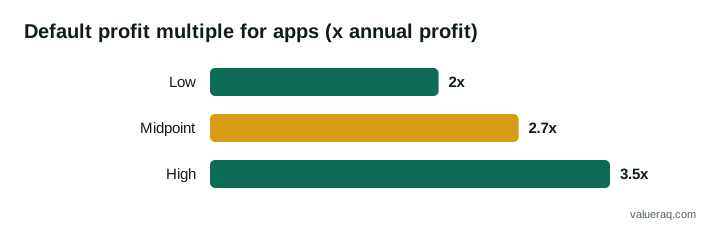
VALUERAQ's default range for a small app is 2.0 to 3.5 times annual net profit, with a midpoint of 2.7. This is an editorial assumption set out in the methodology. It is not market data and not a record of real sales.
The tool then moves that range up or down using fixed rules. The ones that matter most for apps are below.
| Factor | Lowers the multiple | Raises it |
|---|---|---|
| Revenue model | Ads: −5%. Paid downloads: −5% | Subscription: +5% |
| Platforms | Single store: no change | Both iOS and Android: +3% |
| Revenue trend, last 12 months | Down over 20%: −25%. Down 5% to 20%: −12% | Up 5% to 25%: +8%. Up 25% to 75%: +15%. Above 75%: +20% |
| Share of installs or sales from one channel | Over 80%: −12%. Over 60% to 80%: −6% | 60% or less: no change |
| App age | Under 1 year: −20%. 1 to 2 years: −10% | 4 years or more: +5% |
| Owner hours a week | Over 40: −10%. 20 to 40: −5% | Under 10: +5% |
The percentages are multiplied together, and the combined factor is limited to between 0.5 and 1.4. The longer explanation of each factor is in the app valuation guide.
Worked example: same profit, different value
Both apps below earn $7,000 a month in revenue and $4,000 a month in profit.
Annual profit = $4,000 × 12 = $48,000
App A is a subscription app on iOS and Android. It is three years old, revenue is up 10% on last year, half of its installs come from its largest channel, and the founder spends 8 hours a week on it.
Combined factor = 1.05 × 1.03 × 1.08 × 1.05 = 1.226 (age and channel add nothing)
Multiple range = 2.0 × 1.226 to 3.5 × 1.226 = 2.45 to 4.29, midpoint 3.31
Value range = $48,000 × those multiples = $118,000 to $206,000, midpoint $159,000
App B is an ad-funded app on iOS only. It is 18 months old, revenue is down 10%, 85% of its installs come from one channel, and the owner spends 25 hours a week on it.
Combined factor = 0.95 × 0.90 × 0.88 × 0.88 × 0.95 = 0.629 (the single store adds nothing)
Multiple range = 1.26 to 2.20, midpoint 1.70
Value range = $60,000 to $106,000, midpoint $82,000
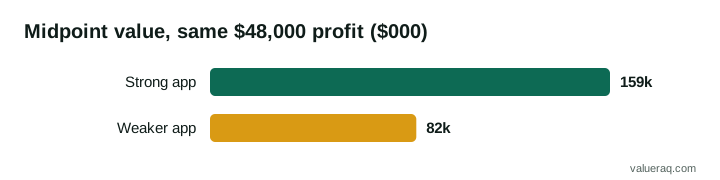
These are illustrations produced by the App Valuation Tool with VALUERAQ's default assumptions. They are not asking prices, and a real buyer may pay more or less. What the example shows is which facts a buyer will push on, and therefore which ones are worth improving before you list.
Step 3: Gather the records buyers ask for
Buyers of apps want to confirm that the profit is real and will continue. Have these ready before you list:
- Store payout statements for the last 12 months from the App Store and Google Play.
- Subscription data: active subscribers, monthly churn, renewal rates and refund rates.
- Install sources: how many installs come from store search, paid ads, social media and referrals.
- Cost records: ad spend, servers, third-party services, contractor invoices.
- Technical details: how the app is built, which third-party services and software development kits (SDKs) it uses, and who holds the source code and developer accounts.
- Legal items: the privacy policy, terms of service and any licences for code or artwork.
The SBA's guidance for buyers says to carry out a "thorough, objective investigation" of a business and to review financial statements, tax returns, contracts and cash flow. Expect an app buyer to do the same, and give them what they need. Clear records also make it easier to defend your asking price.
For how buyers verify what you send, see the due diligence checklist and the guide on what documents buyers ask for.
Step 4: Reduce the risks you can fix
You can change some of the factors in the table above before you list.
- Owner dependence. If you are the only person who can ship an update, document how the app is built and released. A buyer will pay more for a business that does not depend on one person.
- Channel concentration. An app with most installs from one place is exposed if that channel changes. Even a small amount of income from a second source helps.
- Refresh and bug fixes. Fix known crashes and clear any warning from the store before you list. A buyer will read the reviews.
- Clean accounts. Make sure the developer accounts, domain, support email and analytics accounts are all under your control, not a former contractor's.
Step 5: List the app
A good listing states facts a buyer can check. Include the platforms, the revenue model, average monthly revenue and profit over 12 months, the age of the app, the main install sources, what you do each week, and why you are selling. Leave out hype and promises. Do not guess at what a buyer could earn.
You can list on VALUERAQ for free (see fees). Buyers browse the apps for sale, see the multiples your asking price implies, and message you inside the platform. Your app's name and store link can stay private until you choose to share them with a serious buyer. Compare an asking price you set with the tool's range, and be ready to explain any gap.
Be cautious with early messages. Do not share logins, store credentials or source code with anyone before you have agreed terms, and share read-only views of your data rather than account access. The buyer safety page explains how to spot problems on either side.
Step 6: Agree terms in writing
Once you have a serious buyer, the usual order is a letter of intent, then due diligence, then a purchase agreement. Settle these points in writing:
- The price and how it is paid: all at closing, or with seller financing or an earnout for part.
- Exactly what is included: the app, source code, developer accounts, domain, brand, social accounts, support inbox and customer data.
- A transition period during which you answer questions and help with the first releases.
- What happens to pending payouts from the stores. Google states that orders created before an app is transferred stay in the original account, so agree who keeps that money.
Use an independent escrow service for the payment, and have a lawyer review the agreement. The SBA's guidance on selling a business also recommends having an attorney review the sales agreement.
Step 7: Transfer the app through the store
Both stores have their own transfer process. Use it. Handing over a password is not a transfer, and it leaves ownership of the app unclear.
Apple App Store
Apple's documentation says you need to transfer app ownership "when you've sold the app to another developer." The main points from Apple's guidance:
- The app must have at least one version that was released on the App Store.
- Both accounts must have accepted the latest agreements and not be in a pending state.
- The app cannot be on pre-order or in review at the time of transfer.
- The Account Holder of the sending account starts the transfer, and the Account Holder of the receiving account accepts it.
- The Bundle ID stays the same. Apple states that "during and after the transfer, the app retains its reviews and ratings, and users continue to receive updates."
- If the app uses Apple Pay, "the merchant ID isn't transferred along with the app," so the buyer must set that up again.
- Game Center groups and matchmaking configuration do not transfer.
- In-app purchase product IDs must not clash with products already in the buyer's account.
Google Play
Google's documentation says that "both Google Play developer accounts need to be registered and active." Other points from Google:
- Users, statistics, ratings, reviews and subscriptions transfer with the app.
- Paid apps and apps with in-app products need an active payments profile on the receiving account.
- You need the receiving account's registration transaction ID. A buyer without a Google Play developer account has to open one first, which costs a one-time US$25 registration fee, so agree who pays.
- Promotions, test groups and earnings reports do not transfer.
Plan the order of the handover
A sensible order is: back up everything, agree a date, start the store transfers, move the source code and third-party service accounts, switch over analytics and support, and then release a first update from the buyer's account. Do not hand over the final payment details until the buyer confirms the app appears in their account and builds correctly. A checklist for the non-store parts is in how to transfer a website to a new owner, and most of it applies to an app too.
Comparison: what moves with the app, and what does not
| Item | Apple App Store | Google Play |
|---|---|---|
| Reviews and ratings | Move with the app | Move with the app |
| Users and subscriptions | Users keep receiving updates | Users, statistics and subscriptions move |
| Payment setup | Apple Pay merchant ID does not transfer | Receiving account needs an active payments profile |
| Not transferred | Game Center groups and matchmaking configuration | Promotions, test groups and earnings reports |
| Receiving side needs | Account in good standing with latest agreements accepted | Registered, active developer account |
Check Apple's and Google's current pages before you start. The stores change their rules, and the pages listed under Sources are the authority, not this summary.
Frequently asked questions
How much can I sell my app for?
It depends mainly on profit, revenue model, growth and how much of the income depends on you or one channel. VALUERAQ's default range is 2.0 to 3.5 times annual net profit, adjusted by published rules. Use the free mobile app estimation tool for an estimate, and treat the result as a starting point for negotiation.
Can I sell an app that makes no money?
You can try, but a profit multiple cannot price it. Buyers of unprofitable apps look at the users, the code or the brand, and offers are usually low and uncertain. The tool does not estimate value for apps with zero or negative profit.
Do I keep my reviews if I sell the app?
Apple says an app retains its reviews and ratings during and after a transfer, and Google says ratings and reviews move with a transferred app. This only applies when you use the stores' own transfer process.
Should I sell on my own or use a broker?
Both are used. Selling yourself costs less but takes more of your time. Our guide to ways to sell a digital business compares the options.
Sources
- Apple, Overview of app transfer
- Apple, App transfer criteria
- Google Play Console Help, Transfer ownership of an app
- U.S. Small Business Administration, Buy an existing business or franchise
- U.S. Small Business Administration, Close or sell your business
- VALUERAQ, Valuation methodology
Next step
Price your app before you list it. The free App Valuation Tool shows the multiple and every adjustment.
Written by VALUERAQ Editorial Team. The VALUERAQ editorial team writes and maintains the platform's guides, methodology and glossary. Every guide is reviewed against the published methodology before publication and when the methodology changes.