Key takeaway
A data room is the folder a serious buyer works through before they commit. If it is complete, labeled and easy to follow, due diligence moves quickly and the buyer has fewer reasons to lower the offer. If it is patchy, every gap becomes a question, and every question becomes a delay.
This guide is written for the seller. It gives a 30-item checklist split into five folders, a way to share the folders in stages, and a worked example of what a $7,000 gap between your books and your bank can cost. It does not repeat the buyer's view of the process, which is in the digital business due diligence guide, or the short list in what documents buyers ask for. The multiples used below are VALUERAQ's own default assumptions from the methodology, not market data. Nothing here is legal, tax or financial advice.
What a data room is, and why build it before you list
A data room is a secure, organized set of records that you share with a buyer during due diligence. For a small online business it is usually a shared cloud folder with sub-folders, not special software.
The U.S. Small Business Administration tells buyers to carry out a "thorough, objective investigation" of a business before they buy (SBA). It lists financial statements and tax returns among the documents to evaluate, and tells buyers to ask about contracts, leases, existing cash flow and inventory. Your data room is the place where a buyer finds the answers to that investigation.
There are three reasons to build it before you list rather than after an offer arrives:
- Speed. Gathering two years of records takes days. If you start after a buyer is waiting, they wait too.
- Fewer surprises. Assembling the folders shows you where your own records disagree. It is better to find a mismatch yourself and explain it than to have the buyer find it.
- A calmer negotiation. A seller who answers questions with a file link looks organized. That supports the asking price.
The five folders
Use the same five folder names every time. Number them so they sort in order.
| Folder | What it proves | Items |
|---|---|---|
| 1. Financials | The profit is real | 8 |
| 2. Traffic and sales | The audience and orders are real | 5 |
| 3. Assets and accounts | You own what you are selling | 7 |
| 4. Contracts | What comes with the business, and what it owes | 6 |
| 5. Operations | How it runs without surprises | 4 |
| Total | 30 |
Folder 1: Financials (8 items)
- Monthly profit and loss statements for the last 12 to 24 months. See how many months of data buyers want.
- A trailing twelve months summary on one page.
- Balance sheet, if you keep one.
- Business tax returns for the last two years, if you have filed them.
- Bank statements for every business account, matching the months in item 1.
- Payment processor payout reports (for example Stripe, PayPal or a marketplace's payout history), matching the deposits.
- A schedule of add-backs: each one-off or personal cost you add to profit, with the invoice or a one-line reason.
- A list of unpaid bills, loans, refunds owed and open disputes or chargebacks.
BizBuySell defines add-backs as "expenses added back to a company's bottom-line profits when determining Seller's Discretionary Earnings (SDE) or EBITDA," and warns that "some add-backs can unrealistically overvalue the company" (BizBuySell). That is why item 7 needs paper behind every line. An add-back with no invoice is the first thing a buyer will challenge.
Folder 2: Traffic and sales (5 items)
- Read-only access to your analytics, or exported monthly reports, for the same months as the financials.
- Search performance reports, if search is a main source of visitors.
- A breakdown of revenue by source: affiliate network, advertising network, product line, subscription plan or sponsor.
- For stores and subscription products, an order or subscriber summary with refunds and cancellations shown.
- A short note explaining any month that is clearly higher or lower than the rest.
Folder 3: Assets and accounts (7 items)
- The domain registrar account and expiry date.
- Hosting, platform or app-store accounts, and who is the account owner.
- Code repository access details, if there is custom code.
- Email platform or subscriber list ownership.
- Social media and marketplace seller accounts that are part of the sale.
- Trademarks, logos and brand files.
- A single sheet listing every account, its owner login, any shared users, and whether the login can be transferred.
Do not put passwords in this folder. Say which accounts exist and who controls them. Credentials change hands at closing, usually through an agreed process with escrow.
Folder 4: Contracts (6 items)
- Supplier or manufacturer terms.
- Advertiser, sponsor and affiliate agreements, with renewal dates.
- Customer terms of service and refund policy.
- Software subscriptions the business needs to run.
- Contractor and freelancer agreements, and what each person does.
- Any exclusivity, non-compete or licence terms that a new owner would inherit.
Folder 5: Operations (4 items)
- A weekly task list: what you do, how many hours, and how often.
- Step-by-step notes for the five most repeated tasks.
- A list of tools and what each is used for.
- A short handover plan: how many weeks you can help after closing. See the transition period.
A ready-made folder tree
Copy this structure into your cloud drive. The numbers keep the folders in order.
| Folder name | Put inside |
|---|---|
| 00_Index | The one-page list of every file and what it shows |
| 01_Financials | Profit and loss statements, trailing twelve months summary, bank statements, payout reports, add-back schedule, tax returns |
| 02_Traffic_and_Sales | Analytics exports, search reports, revenue by source, orders or subscribers |
| 03_Accounts_and_Access | Account list with owners, domain and hosting details, code repository details |
| 04_Contracts | Supplier, sponsor, affiliate, contractor and software agreements |
| 05_Operations_and_SOPs | Weekly task list, step-by-step notes, tools list, handover plan |
| 06_Legal_and_IP | Trademarks, logos, privacy policy, terms of service, image and font licenses |
Notes on privacy and access: share read-only, never share passwords in a document, and replace customer names and emails with totals unless a lawyer has said the buyer may see them. Turn access off for any buyer who walks away, and keep a note of who saw which folder and when.
Share in stages, not all at once
You do not need to give everything to everyone. A staged release keeps sensitive information with fewer people until a sale is likely.
| Stage | Who gets access | What they see |
|---|---|---|
| 1. Listing | Anyone who views the listing | Summary figures only |
| 2. After a signed non-disclosure agreement | Interested buyers | Folder 1 summaries and Folder 2 reports |
| 3. After a signed letter of intent | One buyer | All five folders, read-only |
| 4. Near closing | One buyer and their advisers | Account transfer details, by the agreed process |
Three practical rules:
- Share by named person. Use a link that needs a sign-in, not an open link.
- Redact personal data. Customer names, emails and payment details should be removed or replaced with totals unless a lawyer has said the buyer may see them.
- Keep one master copy. Change files in one place. Do not email attachments, or you will lose track of which version a buyer holds.
Worked example: why matching sources matters
Here is an invented seller with a content website. The default range for a website in the methodology has a midpoint multiple of 3.2 on annual profit.
The seller's profit and loss statement shows $48,000 of profit for the year. The buyer compares the statement with the bank deposits and payout reports and finds that the deposits support only $41,000.
| Measure | Annual profit | Value at 3.2x |
|---|---|---|
| Seller's statement | $48,000 | $153,600 |
| Supported by deposits | $41,000 | $131,200 |
| Difference | $7,000 | $22,400 |
The arithmetic: $48,000 × 3.2 = $153,600. $41,000 × 3.2 = $131,200. $153,600 − $131,200 = $22,400, which is the same as $7,000 × 3.2.
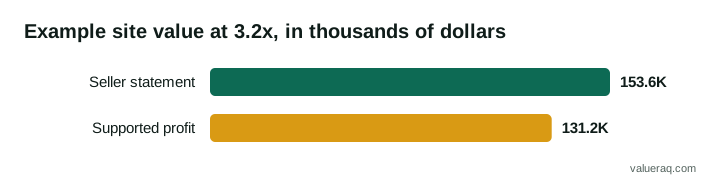
If the gap has a clean reason, such as $7,000 of income that was booked in the statement but paid after year end, a one-line note in Folder 1 closes the question. If the data room has no note, the buyer assumes the lower number. This is why items 5, 6 and 7 in Folder 1 are the most important in the room.
Where seller effort goes
Not every folder takes the same time. In a typical small business, most of the work is in the financial folder, because those records come from several systems and have to agree with each other.
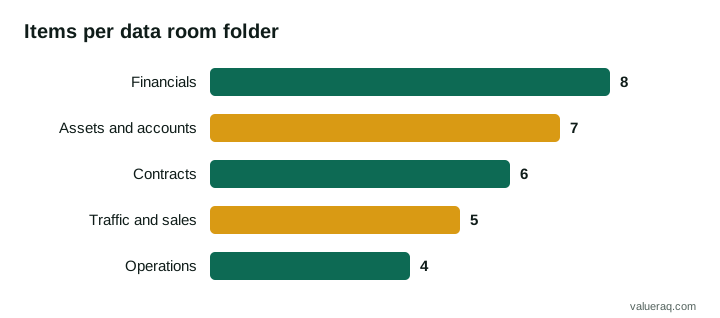
A reasonable order of work is financials first, then assets and accounts, then contracts, then traffic, and operations last, since it is the only folder that comes from your head rather than from a system.
How to name and organize files
- Start every file with a date in year-month order, such as
2026-09_profit-and-loss.pdf, so folders sort correctly. - Use plain names.
bank-statement-checking-2026-09.pdfbeatsscan0042.pdf. - Put a one-page index at the top of the room that lists every file and what it shows.
- Keep spreadsheets as spreadsheets, so the buyer can check formulas. Export a PDF copy as well.
- Remove old drafts. A buyer who finds two versions of the same statement will ask which is right.
A pre-listing checklist
- [ ] All 30 items are collected, or marked "not applicable" with a reason.
- [ ] Revenue in the books agrees with payouts and bank deposits, or the gap is explained in writing.
- [ ] Every add-back has paper behind it.
- [ ] Every account is listed with its owner.
- [ ] Personal data is removed or summarized.
- [ ] Access is set to named people and read-only.
- [ ] A lawyer and an accountant have seen the room if the sale is large. The SBA suggests buyers consider "hiring an attorney and an accountant" and sellers have the same reasons to.
Printable one-page version
Tick each line when it is in the room: 01 financials (8 items) · 02 traffic and sales (5) · 03 accounts and access (7) · 04 contracts (6) · 05 operations (4) · 06 legal and IP (trademarks, policies, licenses) · 00 index written · access set to named people, read-only · personal data removed · a note written for every gap.
Frequently asked questions
Do I need special data room software?
Usually no. For a small online business a shared cloud folder with named-person access is enough. Dedicated software is more common in larger company sales. Choose whatever lets you control who sees what, turn access off, and see who opened which file.
When should I open the data room to a buyer?
After the buyer has signed a confidentiality agreement, and in stages. Give summaries first, then full records once there is a letter of intent. Share account credentials only at the point the transfer is being carried out.
What if my records are messy?
Fix what you can and explain the rest. A short written note about a gap is better than silence. Rebuilding a clean monthly profit and loss statement from bank and payout records is the single most useful job, because it is what most buyers read first.
Who should see the data room first?
Only buyers who have signed a confidentiality agreement and shown they can fund the purchase. See proof of funds. Start with the summaries in folders 01 and 02.
Should I put customer data in the data room?
Usually only totals. Individual customer details raise privacy questions, so remove them and offer more later if the buyer needs it and your lawyer agrees.
How much history should I include?
Most buyers look at 12 to 24 months. See how many months of data buyers want for how to decide, and the financial due diligence checklist for what the buyer will do with the figures.
Sources
- U.S. Small Business Administration, Buy an existing business or franchise.
- BizBuySell Learning Center, Add-Backs for Seller's Discretionary Earnings.
- U.S. Small Business Administration, Close or sell your business.
- VALUERAQ methodology for the default multiples used in the worked example.
Next step
See the same checklist from the buyer's side so you know what each question is for.
Written by VALUERAQ Editorial Team. The VALUERAQ editorial team writes and maintains the platform's guides, methodology and glossary. Every guide is reviewed against the published methodology before publication and when the methodology changes.