Key takeaway
Buying an app is buying a stream of store payouts, a user base and a code base that only the store's transfer process can legally move to you. Most mistakes come from paying for downloads, trusting a dashboard screenshot, or skipping the transfer rules. If you check the payouts, the subscribers, the install sources and the transfer rules before you pay, you remove most of the risk.
In the worked example below, an app priced at $120,000 earns $48,000 a year in profit, so the seller is asking 2.5 times profit. VALUERAQ's default range for a small app is 2.0 to 3.5 times profit, so that ask sits inside the range. Whether it is a good price depends on the checks in this guide, not on the multiple alone.
This guide covers what is specific to apps. For the process that applies to any online business, see buying digital businesses.
What you are actually buying
An app sale usually includes more than the app itself. Before you talk price, write down what is on offer:
- The app and its store listings on the App Store, Google Play or both.
- The source code and the right to change it.
- The developer account items that move with the app, such as reviews and ratings.
- Third-party services the app depends on: servers, databases, analytics, push notifications and payment tools.
- The domain, support email, brand name and social accounts.
- The user data, to the extent privacy rules and the store allow it to be passed on.
Anything not listed in writing is not included. A seller who cannot say who owns the source code is a warning sign.
Step 1: Decide what kind of app you want
Apps earn money in different ways, and the way changes how risky the profit is. VALUERAQ's app valuation rules treat them differently:
| Revenue model | Effect on VALUERAQ's multiple | Why |
|---|---|---|
| Subscriptions | +5% | More predictable income |
| In-app purchases | Baseline (0%) | Income depends on users making new purchases |
| Ads | −5% | Depends on ad rates and user volume |
| Paid downloads | −5% | Needs new sales every month |
Platform matters too. An app available on both major stores adds 3% in the tool, because it is not tied to one store's rules. These adjustments are VALUERAQ's editorial assumptions, set out in the methodology. They are not market data.
Decide how much of the app you can run yourself. If you cannot read code, plan to hire a developer before you buy, or choose an app where the seller will stay on for a while.
Step 2: Find apps for sale
You can browse apps for sale on VALUERAQ, where listing and contacting sellers is free (see fees). Each listing shows the asking price and the multiple it implies, so you can compare before you message anyone. You can also approach app owners directly, or use a broker, which usually adds a cost (see ways to sell a digital business).
Early on, a listing should tell you the platforms, the revenue model, average monthly revenue and profit over 12 months, the app's age, the main install sources and what the owner does each week. If a listing hides these, ask for them before you spend time.
Step 3: Work out the price you would pay
Most small apps are priced on annual net profit before the owner's pay, known as SDE. Use payouts that actually reached the seller's bank account, after the store's cut, ad spend, servers, tools and contractors.
Worked example: is $120,000 a fair ask?
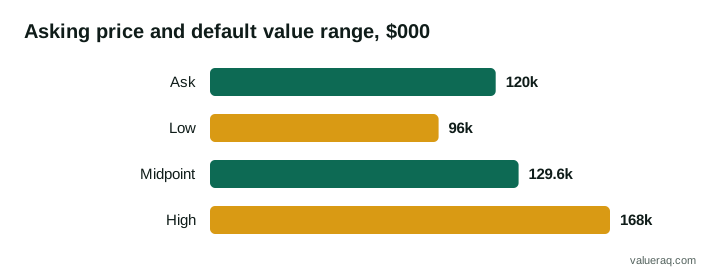
A seller lists an app for $120,000. Its store payout statements for the last 12 months show an average of $4,000 a month in profit.
Annual profit = $4,000 × 12 = $48,000
Asking multiple = $120,000 ÷ $48,000 = 2.5 times profit
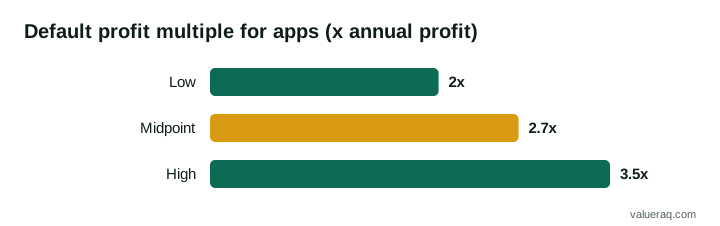
VALUERAQ's default range for apps is 2.0 to 3.5 times profit, midpoint 2.7:
- Low: $48,000 × 2.0 = $96,000
- Midpoint: $48,000 × 2.7 = $129,600
- High: $48,000 × 3.5 = $168,000
The ask is below the midpoint, but you still have to adjust for this particular app. Suppose it is a subscription app (+5%), on iOS only (0%), eight months old (the tool lowers the multiple for apps under one year), and 70% of installs come from one ad network (−6%). Those facts pull the range down, and the profit may also be less steady than it looks. If any of these were different, the same $120,000 could be cheap or expensive.
Run the app's real numbers through the free App Valuation Tool to see the exact multiple and the reason for each adjustment. Treat the result as a starting point for negotiation. It is not an appraisal.
Step 4: The 12 checks before you pay
Ask for evidence for each line. If the seller cannot provide it, lower your offer or walk away.
| # | Check | What to ask for | Red flag |
|---|---|---|---|
| 1 | Store payouts | 12 months of payout statements from each store | Only dashboard screenshots |
| 2 | Bank match | Deposits that match the payouts | Totals that do not reconcile |
| 3 | Subscribers | Active count, monthly cancellations, renewal and refund rates | Count given without churn |
| 4 | Install sources | Store search, paid ads, social, referrals | One source above 60% to 80% of installs |
| 5 | Costs | Ad spend, servers, services, contractors | Costs missing or "paid by the owner" |
| 6 | Ratings and reviews | Current rating, recent reviews, any store warnings | Falling rating, unresolved warnings |
| 7 | Code ownership | Who wrote it and a signed transfer of rights | Freelancer who still holds the code |
| 8 | Third-party services | List of SDKs and services, with whose accounts they sit in | Key services under a former contractor |
| 9 | Platform rules | Any past app rejections or policy notices | Notices ignored |
| 10 | Owner workload | Hours per week, who handles support and releases | Owner is the only person who can ship |
| 11 | Legal items | Privacy policy, terms, licenses for code and artwork | Missing privacy policy |
| 12 | Store transfer | That the app meets the store's transfer rules | Seller plans to hand over a password |
The U.S. Small Business Administration advises buyers to carry out a "thorough, objective investigation" of any business and to look at financial statements, tax returns, contracts and cash flow. For apps, store payout statements and subscription reports take the place of much of that. Our due diligence checklist goes through the same ground in more detail.
Look hard at subscribers
A subscription count alone tells you little. Ask how many people cancel each month. If a subscription app has 2,000 subscribers paying $5 a month and loses 5% of them each month, it loses 100 subscribers, or $500 a month in revenue, and must win 100 new ones just to stand still. That is why churn matters more than the headline number. Ask for cohort data, which shows what people who joined in one month actually paid over time.
Look hard at where installs come from
If most installs come from a single paid channel, the app depends on that channel's prices and rules. Ask what happens to installs and profit when ad spend is cut. Reading install sources is the same skill as judging platform risk: the less one outside company controls the income, the safer it is.
Step 5: Check the store transfer rules before you make an offer
You cannot buy an app by being given the seller's login. Both stores have a transfer process, and the app must meet its rules. Better to find out now than at closing.
Apple App Store
Apple says you transfer ownership "when you've sold the app to another developer." From Apple's guidance:
- The app must have at least one version that was released to the App Store.
- Both accounts must have accepted the latest agreements and not be in a pending state.
- The app cannot be on pre-order or in review at the time of transfer.
- Apple Arcade apps can't be transferred.
- The Account Holder of the sending account starts the transfer and the receiving Account Holder accepts it.
- Apple states that "during and after the transfer, the app retains its reviews and ratings, and users continue to receive updates."
- If the app uses Apple Pay, "the merchant ID isn't transferred along with the app," so you will need to set that up.
- Game Center groups and matchmaking configuration do not transfer.
- In-app purchase product IDs must not clash with products already in your account.
Google Play
Google says "both Google Play developer accounts need to be registered and active." From Google's guidance:
- Users, statistics, ratings, reviews and subscriptions transfer with the app.
- Paid apps and apps with in-app products need an active payments profile on the receiving account.
- You need your account's registration transaction ID. A new developer account costs a one-time US$25 registration fee, so open yours before closing.
- Promotions, test groups and earnings reports do not transfer.
- Google states that "orders that are created before the app is transferred will remain in the original account," so agree who keeps pending payouts.
Open an account on each store you need well before the deal closes. The full process is in how to transfer an app to a new owner.
Step 6: Agree terms in writing
Once you are happy with the checks, the usual order is a letter of intent, a period of due diligence, and then a purchase agreement. Settle these points:
- Price and payment. All at closing, or part later through seller financing or an earnout. An earnout tied to profit can bridge a gap if the seller believes in growth you are not sure about.
- What is included. Use the list from the start of this guide.
- Transition period. Ask the seller to answer questions and help with the first releases. See transition period.
- Seller promises. A clause that the seller owns the code and that the figures given are true, covered by representations and warranties.
- Non-compete. Stop the seller from launching a copy next week. See non-compete agreement.
Have a lawyer review the agreement. The SBA's guidance also says to "consider hiring an attorney and an accountant."
For negotiating tactics, read how to negotiate buying an online business.
Step 7: Pay through escrow and take over
Pay through an independent escrow service rather than sending money straight to the seller. Release funds only when the app shows in your developer account and builds from the source code you received. How escrow works for website sales explains the same steps, which apply to an app.
A sensible order is: sign, pay into escrow, start the store transfer, receive the source code and service accounts, confirm the app builds and runs, release the payment, and then publish a first update from your own account. After closing, change every password and key the seller knew, update the privacy policy to name you, and tell users if the app's terms change.
Common mistakes
- Valuing the app on downloads instead of profit.
- Accepting gross sales figures from a dashboard instead of payouts.
- Buying before checking that the app can be transferred.
- Forgetting that the seller may be the only person who can build and release the app.
- Paying the full price at closing with no earnout or holdback, when the profit is unproven. A holdback keeps part of the money back until agreed conditions are met.
Frequently asked questions
How much does it cost to buy an app?
It depends on profit, revenue model, growth and risk. VALUERAQ's default range for small apps is 2.0 to 3.5 times annual net profit, midpoint 2.7. That is an editorial assumption, not a record of sales. Use the free mobile app estimation tool for a range based on a specific app.
Can I buy an app that has no revenue?
Yes, but a profit multiple cannot price it. You would be paying for the users, the code or the brand, and offers are usually low and uncertain. The tool does not estimate value for apps with zero or negative profit.
Do I keep the reviews and users if I buy an app?
Apple says an app retains its reviews and ratings during and after a transfer, and Google says ratings and reviews move with a transferred app. This applies when you use the store's own transfer process.
Is it safe to buy an app from a stranger online?
It can be, with care. Check the payouts yourself, use escrow, and never accept a login instead of a transfer. Our buyer safety page explains common problems.
Sources
- Apple, Overview of app transfer
- Apple, App transfer criteria
- Google Play Console Help, Transfer apps to a different developer account
- U.S. Small Business Administration, Buy an existing business or franchise
- VALUERAQ, Valuation methodology
Next step
Check what an asking price implies. The free App Valuation Tool shows the multiple and every adjustment.
Written by VALUERAQ Editorial Team. The VALUERAQ editorial team writes and maintains the platform's guides, methodology and glossary. Every guide is reviewed against the published methodology before publication and when the methodology changes.