Key takeaway
Most bad website purchases do not involve a dramatic scam. They involve a number that was never checked, a site the seller did not fully control, or a deal that moved too fast. The fix is to test each claim at its source before any money moves.
This guide lists 14 red flags in four groups: the listing, the money, the traffic, and the seller's behavior. Each one comes with a way to check it. It also works through an example where one strong month turns a $115,200 profit claim into a price more than three times what the records support. It does not repeat the full buyer process, which is in the how to buy a website guide, or the complete checklist in digital business due diligence. The multiples below are VALUERAQ's own default assumptions from the methodology, not market data. Nothing here is legal, tax or financial advice.
Why red flags matter before you pay
The U.S. Small Business Administration tells anyone buying an existing business to carry out a "thorough, objective investigation" first, and to consider hiring an attorney and an accountant (SBA). It lists financial statements and tax returns among the documents to evaluate, and says to ask about contracts, leases, existing cash flow and inventory.
A red flag is not proof of wrongdoing. Many are honest mistakes: a seller who rounds up, forgets a cost, or has never had to prove ownership of their own site. But they have the same effect on you. If a figure is wrong, you pay for income that does not exist. So treat each flag as a question that needs a documented answer, and slow down until you have one.
At a glance: 14 red flags and the check for each
| # | Red flag | How to check it |
|---|---|---|
| 1 | Screenshots only, no source access | Ask for read-only access to the payment or ad dashboard |
| 2 | One strong month quoted as the norm | Add 12 months and divide by 12 |
| 3 | Unexplained jump before listing | Ask for the cause and the dates |
| 4 | Costs missing from the profit figure | Request the full expense list |
| 5 | Price far below the profit claimed | Ask why; compare with a free estimate |
| 6 | Seller cannot prove control of the domain | Ask for a text line you choose, added to the site |
| 7 | Key accounts in someone else's name | List each account and its owner |
| 8 | Traffic and revenue move apart | Compare revenue per visit over time |
| 9 | Most visits from one source | Check the traffic source breakdown |
| 10 | Traffic that does not behave like people | Look for single-country spikes and very short visits |
| 11 | Content or images that may not be the seller's | Ask where each asset came from |
| 12 | Pressure to decide quickly | Do not let a deadline replace your checks |
| 13 | Payment outside escrow | Use an independent escrow service only |
| 14 | Request to leave the platform at once | Keep messages on the platform until trust is earned |
Red flags in the listing
1. Screenshots with no way to check them
A screenshot of a dashboard can be edited, cropped or taken from a different site. The first test of any seller is whether they will give you read-only access to the source: the payment processor, the ad network, the affiliate dashboard. If they will not, ask for original statements instead, and treat a flat refusal as a reason to slow down. The revenue verification guide covers what to compare.
2. A best month presented as the average
This is the most common way a listing misleads without a single false number. Always work from at least 12 months, and use the average. The worked example below shows how much one month can change a price.
3. A sharp rise just before listing
Income that jumped in the last two or three months needs an explanation you can verify: a new product, a new traffic source, a one-off sale. If the cause is temporary, the average is the figure that matters, not the recent peak.
4. Costs missing from the profit figure
Profit is revenue minus the costs of running the business. Ask for the list of costs: hosting, tools, freelancers, ad spend, refunds, fees. Also ask what the owner's own time is worth, because a business that only makes money if someone works 50 hours a week unpaid is priced differently from one that does not. VALUERAQ's default rules lower the multiple by 10% when the owner works over 40 hours a week.
5. A price that looks too good
An asking price far below what the profit would suggest has an explanation, and it is not always a bargain. Put the seller's profit into the Website Valuation Tool and compare the range with the asking price. If the gap is large, ask directly why the seller is selling so cheaply.
Red flags in ownership and assets
6. The seller cannot prove control of the domain
Ask the seller to prove they control the site, for example by adding a line of text you choose to a page. On VALUERAQ, look for the Website ownership confirmed badge, and read the verification page to see what each badge covers and does not cover.
7. Accounts held by someone else
List every account the business depends on: the domain registrar, hosting, analytics, payment processor, ad networks, email service, social profiles. For each, ask whose name it is in and whether it can be transferred. A site whose main income account belongs to a freelancer or a former partner may not be the seller's to sell.
8. Content or assets the seller may not own
Ask where articles, photos, code and designs came from. If a freelancer wrote the content, is there an agreement that gives the business the rights? The what is included when you buy a website guide lists the assets to confirm in writing.
Red flags in the traffic
9. Traffic and revenue that do not move together
If visits doubled and income did not, something is wrong with one of the two. Compare revenue per visit across the 12 months. A sudden fall in revenue per visit can mean the new visits are low quality or not real.
10. Most visits from a single source
A site that gets nearly all its visits from one search ranking, one social account or one partner can lose most of its income in a day. VALUERAQ's default methodology lowers the multiple by 6% when more than 60% of traffic or sales comes from one channel, and by 12% above 80%. Ask for the traffic source breakdown for the full 12 months.
11. Traffic that does not behave like an audience
Look for sudden spikes from one country, visits that last a few seconds, or traffic with no matching sales. The traffic verification guide explains the checks in more detail.
Red flags in the seller's behavior
12. Pressure to decide quickly
A seller who says other buyers are about to pay, or sets a deadline that does not leave time for checks, is asking you to skip the step that protects you. A real business will still be there next week.
13. A request to pay outside escrow
Never pay a seller directly by bank transfer, cryptocurrency, gift cards or a payment app before the assets are yours. Use an independent, recognized escrow service. The buyer pays the escrow service, the seller transfers the site, the buyer checks everything works during an agreed inspection period, and only then is the money released. Go to the escrow service's website yourself. Do not use a link the seller sends, because fake escrow sites are a known scam.
14. A request to leave the platform at once
Moving to private email or a chat app on the first day removes the record of what was promised. Keep messages on the platform until you are confident about the other person. VALUERAQ shows your email address to a seller only when you send them a message.
Worked example: one month changes the price
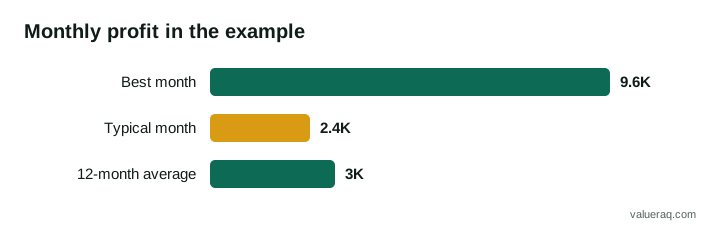
A listing says a website earns "$9,600 a month in profit" and asks for a price based on that figure. The seller shares 12 months of records. Eleven months show a profit of $2,400. One month, a large one-off sponsorship, shows $9,600.
- Total profit over 12 months: 11 × $2,400 + $9,600 = $26,400 + $9,600 = $36,000.
- Real average: $36,000 ÷ 12 = $3,000 a month.
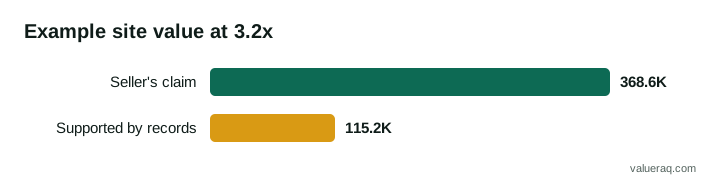
- The seller's annualized claim: $9,600 × 12 = $115,200.
- Value on the claim at 3.2x: $115,200 × 3.2 = $368,640.
- Value on the records at 3.2x: $36,000 × 3.2 = $115,200.
The listing price is more than three times what the records support: $368,640 ÷ $115,200 = 3.2. The 3.2x is VALUERAQ's default website midpoint, used here only to show the arithmetic. The figures are invented for the example.
The one-off sponsorship is not necessarily dishonest. A buyer might even value it. But it is not a monthly income, and the price should not treat it as one. This is why the average over a full year is the number to price from.
What to do when you see a red flag
- Write the question down and send it to the seller in the platform's messages, so there is a record.
- Ask for evidence, not reassurance. A statement, a login, a contract, a dated screenshot is evidence. "Trust me" is not.
- Decide what would settle it. For each flag, know what answer would make you comfortable and what would make you leave.
- Get professional help for the contract. The SBA suggests an attorney and an accountant. A letter of intent and a purchase agreement should set out the price, the assets, the handover and what happens if something is untrue.
- Walk away if the answers do not come. One unresolved red flag can be managed. Several is a pattern.
If you think a listing is fraudulent, report it with the listing number. If you have already paid, contact your bank or card provider and the escrow service straight away, and report it to the police or the fraud-reporting service in your country.
Frequently asked questions
Is a verified listing free of red flags?
No. A verification status means named evidence was checked against the listing's figures for the period checked. It does not cover everything, and it does not replace your own review of the records and the contract.
How many months of records should I ask for?
At least 12, so you see every season and any one-off. Longer is better if the seller has it. The guide on how many months of data buyers want explains why.
What if the seller refuses read-only access?
Ask for original statements from the payment processor or ad network instead. If the seller will provide neither, you have nothing you can check, and that is a reason to walk away.
Can I use a free valuation to test the asking price?
It can help as a sanity check. Enter the supported profit, not the claimed profit, and compare the range with the price. The range is a default assumption, not an appraisal.
Sources
- U.S. Small Business Administration, Buy an existing business or franchise: advises a "thorough, objective investigation", lists financial statements and tax returns among documents to evaluate, and suggests hiring an attorney and an accountant.
- VALUERAQ, Buyer safety, Verification and Methodology.
Next step
Our buyer safety page lists the warning signs and the steps to take before you pay.
Written by VALUERAQ Editorial Team. The VALUERAQ editorial team writes and maintains the platform's guides, methodology and glossary. Every guide is reviewed against the published methodology before publication and when the methodology changes.