Key takeaway
The ROI of a website purchase is one division: the net profit you expect to keep in a year, divided by everything you pay to get the site and make it yours. The answer is a percentage. Its mirror image is the payback period, the number of months it takes for profit to add up to the price.
Both numbers are easy to calculate and easy to get wrong. The usual mistakes are using the seller's profit figure without checking what it leaves out, leaving the costs of buying out of the bottom line, and treating last year's profit as a promise. This guide shows the arithmetic step by step, with a worked example and a table of what happens when profit falls. For the short definitions, see return on investment and payback period; this page goes further into using them on a real purchase.
Every figure in this guide is an invented illustration of arithmetic. None of it is market data, and none of it predicts what any site will earn.
What ROI means for a website buyer
A website is bought for the profit it produces. ROI answers a plain question: for every dollar I put in, how many cents come back each year?
Annual ROI = annual net profit ÷ total cost of buying × 100
The textbook version is gain minus cost, divided by cost. For a business that produces profit every year, the yearly version above is the one buyers use: it measures the return on the money tied up in the site. Over a longer holding period the total gain is larger, so always say which period a percentage covers.
The two measures are linked:
Payback period (in years) = total cost ÷ annual net profit
If annual ROI is 33.3%, payback is 1 ÷ 0.333 = 3 years. A higher ROI always means a shorter payback. Buyers often prefer one or the other, but they describe the same facts.
Step 1: choose the right profit figure
Most of the error in a website ROI sits here, not in the division.
Listings for small sites usually show seller's discretionary earnings, or SDE. SDE is profit before the owner's pay. That is a fair way to compare small businesses, because each buyer will decide how much of the work to do personally. But it means SDE is not the same as the money you keep if you hire someone to run the site.
So start with the seller's figure and then adjust it for your own situation:
- Take the seller's SDE or net profit, averaged over the last 12 months. How to calculate SDE shows what goes into it.
- Check the add-backs. The BizBuySell Learning Center defines add-backs as expenses added back to a company's bottom-line profits when determining Seller's Discretionary Earnings (SDE) or EBITDA, and warns that some add-backs can unrealistically overvalue the company. Ask for proof of any add-back you do not understand.
- Subtract the cost of any work you will pay for. If the seller spent 20 hours a week on the site and you will pay a contractor, deduct that cost.
- Subtract new costs the seller did not have, such as tools, hosting changes or a higher advertising budget you plan to run.
The result is profit as it will look in your hands. That, not the headline figure, goes into the ROI formula. If you are comparing two sites, use the same method for both so the percentages mean the same thing.
Step 2: work out the full cost of buying
The price in the listing is not the whole cost. Add everything you pay to own the site and run it from day one.
| Cost item | Example amount | Note |
|---|---|---|
| Purchase price | $90,000 | The agreed price |
| Escrow and transfer fees | $1,500 | Depends on the service used |
| Legal review of the agreement | $2,000 | Ask for a quote |
| Fixes needed at takeover | $1,500 | For example, repairs found in due diligence |
| Cash held back as a working reserve | $1,000 | For the first month of bills |
| Total cost | $96,000 |
The U.S. Small Business Administration describes a "thorough, objective investigation" before buying an existing business, and suggests that you consider hiring an attorney and an accountant. Those fees belong in your cost. They are part of the price of making a safe purchase. The checks themselves are listed in the digital business due diligence guide.
If you borrow part of the price, the interest is a cost too. The financing guide covers the options. For the simple ROI in this guide, treat the whole cost as your own money, then repeat the calculation with the loan if you plan to use one.
Worked example: a simple purchase
A hypothetical content website is listed at $90,000. The seller shows average net profit of $2,500 a month over the last 12 months. The seller does most of the work, and the buyer plans to do it too.
Annual net profit = $2,500 × 12 = $30,000.
Annual ROI = $30,000 ÷ $90,000 × 100 = 33.3%.
Payback period = $90,000 ÷ $2,500 = 36 months, or 3 years.
The price is 3.0 times annual profit. A price of 3.0 times profit is the same fact as an ROI of 33.3%, since 1 ÷ 3.0 = 0.333. This link is the quickest check on any listing: divide 1 by the multiple to get the yearly return, or divide 100 by the yearly return to get the multiple.
The same site with the real costs added
Now use the more careful version. The total cost is $96,000, as in the table above. And suppose the buyer decides to pay a contractor $400 a month for part of the work, so profit after that cost is $2,500 − $400 = $2,100 a month.
Annual net profit = $2,100 × 12 = $25,200.
Annual ROI = $25,200 ÷ $96,000 × 100 = 26.25%, shown as about 26.3%.
Payback period = $96,000 ÷ $2,100 = 45.7 months, about 3.8 years.
Same website, same asking price, and a return that is 7.1 points lower: 33.3% − 26.25% is about 7.1 percentage points on the rounded figures. This is why the first step of any ROI calculation is the profit you will keep and the cost you will really pay, not the numbers in the listing.
How ROI relates to the multiple
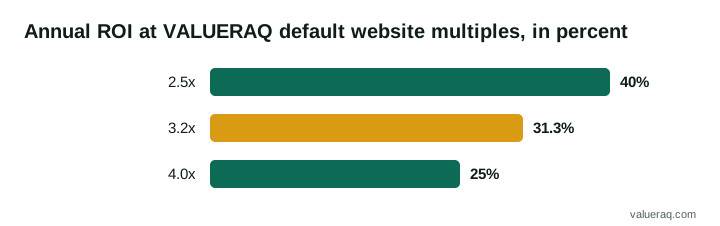
The multiple a seller asks and the ROI a buyer earns are two views of the same thing. VALUERAQ's default range for a website is 2.5x to 4.0x annual net profit, with a midpoint of 3.2x, before adjustments. These are VALUERAQ editorial assumptions, not market data. The methodology explains where they come from and how they are adjusted. Turned into yearly returns on profit alone, they look like this:
- At 2.5x: 1 ÷ 2.5 = 40.0% a year
- At 3.2x: 1 ÷ 3.2 = 31.25%, shown as about 31.3% a year
- At 4.0x: 1 ÷ 4.0 = 25.0% a year
| Multiple of annual profit | Annual ROI on profit alone | Payback period |
|---|---|---|
| 2.5x | 40.0% | 30 months |
| 3.2x | 31.3% | 38.4 months |
| 4.0x | 25.0% | 48 months |
Payback in months is the multiple times 12, so 2.5 × 12 = 30, 3.2 × 12 = 38.4 and 4.0 × 12 = 48. A lower multiple is not automatically better. A site priced at a low multiple may be cheap because its profit is at risk, for example because most traffic comes from one source. What multiple do websites sell for explains what moves a multiple up or down, and the website valuation guide covers the methods behind the range.
Step 3: test what happens if profit falls
Both ROI and payback assume that the profit you use keeps coming in. Past profit is not a forecast. The Corporate Finance Institute notes that valuation multiples only consider the company's position for a certain time period, and the same limit applies to any ROI built on trailing profit. A careful buyer therefore runs the numbers on lower profit as well.
Take the simple example again: a $90,000 price and $30,000 of annual profit. The table cuts profit by 10%, 20% and 30%.
| Case | Annual profit | Monthly profit | Annual ROI | Payback |
|---|---|---|---|---|
| Profit holds | $30,000 | $2,500 | 33.3% | 36 months |
| Profit falls 10% | $27,000 | $2,250 | 30.0% | 40 months |
| Profit falls 20% | $24,000 | $2,000 | 26.7% | 45 months |
| Profit falls 30% | $21,000 | $1,750 | 23.3% | 51.4 months |
The arithmetic for the last row is $30,000 × 0.70 = $21,000, then $21,000 ÷ $90,000 = 23.3%, and $90,000 ÷ $1,750 = 51.4 months.
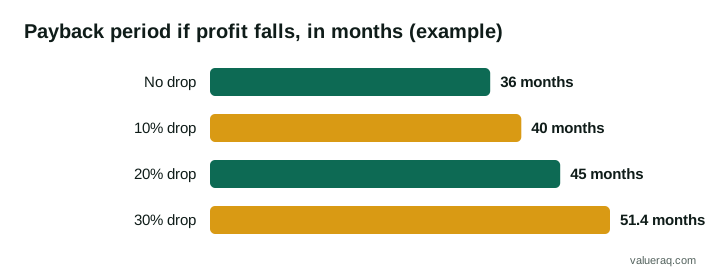
A 30% fall in profit adds 15.4 months to payback (51.4 − 36). The table does not say a fall is likely. It shows how much room you have. If a 30% drop would still leave you able to cover your costs and still be comfortable, the purchase has a margin. If a 10% drop would hurt, the price may be too high for the risk, or the site may need a closer look.
What could cause a fall? Red flags when buying a website lists common warning signs, and how to verify website traffic and how to verify website revenue show how to check the figures behind the profit.
Comparing ROI with another use of the money
ROI means more next to a real alternative. Take the same $96,000 total cost and compare it with putting that money somewhere else. The 4% rate below is made up to show the arithmetic. It is not a current rate and not a forecast.
| Choice | Yearly return on $96,000 | How the figure is reached |
|---|---|---|
| Website (profit holds) | $25,200 | From the worked example above |
| Website (profit falls 30%) | $17,640 | $25,200 × 0.70 |
| Made-up 4% alternative | $3,840 | $96,000 × 0.04 |
The website's figure carries risk and needs your time, and the alternative may not. So compare the extra return with the extra risk and hours, not just the two percentages. No return is promised by either choice, and a site's profit can fall or stop.
Once you have your own numbers, the business multiple calculator turns a price and a profit into a multiple, so you can see where the listing sits against the ranges above.
ROI is not the whole decision
ROI is a good first filter and a poor final answer. Keep these limits in mind.
It ignores risk. Two sites can show the same ROI while one depends on a single traffic source and the other does not. The platform risk entry explains why that dependence matters.
It ignores your time. If the site needs 30 hours a week from you, the effective return per hour may be low even when the percentage looks high. Decide in advance what your time is worth, and include a paid replacement if you want a hands-off result.
It ignores what happens at the end. You may be able to sell the site later, and the sale price counts as part of the return. That price cannot be known in advance, so treat it as an unknown, not a bonus to count on.
It ignores the choice of a different use of the money. ROI helps most when you compare it against another option you are really considering. A figure on its own says little.
A short checklist before you decide
- Confirm 12 months of profit, month by month, against bank or payment records.
- Replace the seller's SDE with the profit you will keep after paying for help.
- List every cost of buying and add it to the price.
- Calculate ROI and payback on those numbers.
- Repeat with profit 10%, 20% and 30% lower.
- Compare the price with a range from an independent method, such as the free website valuation tool. It gives an estimate, not an appraisal.
- Review the agreement with a lawyer before you sign.
For the full process from search to handover, see how to buy a website.
Frequently asked questions
What is a good ROI when buying a website?
There is no single right number. It depends on the risk of the site, the work you will put in and the other uses you have for your money. A higher return usually comes with a higher risk, so compare ROI together with traffic sources, customer concentration and the age of the site.
Is ROI the same as the payback period?
No, but they are linked. ROI is a yearly percentage, and payback is the time to earn the price back. In the simple example, ROI is 33.3% a year and payback is 36 months. You can get one from the other: payback in years equals 100 divided by the ROI percentage.
Should I use revenue or profit to calculate ROI?
Use profit. Revenue is money before costs, and a site with high revenue can still earn little. The return on a purchase comes from what is left after costs, so profit is the right figure. Use the version that is after paying for any work you will not do yourself.
How do I calculate ROI on a website quickly?
Divide the yearly profit you expect to keep by the total you pay, then multiply by 100. For example, $25,200 ÷ $96,000 × 100 = 26.25%. Then test it with lower profit.
Does a loan change the calculation?
Yes. Interest and repayments reduce the cash you keep, and borrowing lowers the money you put in yourself. Run the calculation both ways, with and without the loan, and make sure you can meet the repayments if profit falls.
Sources
- U.S. Small Business Administration, Buy an existing business or franchise: investigation, documents to evaluate and professional help.
- BizBuySell Learning Center, Add-Backs for Seller's Discretionary Earnings: the definition of add-backs and the warning about overvaluation.
- Corporate Finance Institute, Multiples analysis: the point that multiples only consider a certain time period.
- VALUERAQ, Valuation methodology: the default website range and its stated limits.
Next step
To compare an asking price with a range based on earnings, enter the site's 12-month averages in the free website valuation tool.
Written by VALUERAQ Editorial Team. The VALUERAQ editorial team writes and maintains the platform's guides, methodology and glossary. Every guide is reviewed against the published methodology before publication and when the methodology changes.