Key takeaway
A buyer is not only buying your profit. They are buying the ability to keep earning it after you leave. Write down how the business makes money, how each repeating task is done, which accounts and suppliers it depends on, and how a new owner takes over in the first 90 days. The more of this sits on paper instead of in your head, the less a buyer has to guess, and guessing is usually priced as risk.
This guide is for sellers who want to be ready before they list. It sits next to our data room checklist, which covers the financial and legal papers a buyer asks for. This guide covers the other half: the know-how. The figures in the worked example are made up to show the arithmetic. Multiples come from VALUERAQ's published default ranges on the methodology page, not from market data.
Why documentation changes what a buyer will pay
Every buyer asks the same quiet question: "What happens if the owner is gone?" If the honest answer is "it stops," the buyer sees key person risk, and a business that depends on one person is worth less than one that does not.
Documentation answers the question before it is asked. It does three things:
- It shortens the buyer's checking. A buyer who can read how a task is done does not need to interview you three times.
- It lowers the buyer's fear of the handover. The first weeks after closing are when most new owners feel lost. A written plan tells them they will not be.
- It protects you. A written handover list shows what you promised to teach. Without it, a buyer can say later that you left something out.
The U.S. Small Business Administration tells anyone buying an existing business to carry out a "thorough, objective investigation" and lists contracts, existing cash flow and inventory among the things to ask about. Expect to be asked, and answer on paper.
Documentation does not guarantee a higher price, and no one can promise one. What it does is remove reasons for a buyer to lower an offer. The VALUERAQ tools do ask about owner involvement when they estimate a range, because buyers weigh it.
What to document: the seven parts
You do not need a 200-page manual. You need seven short documents, each written so that a smart stranger could follow it.
| Part | What it answers | Typical format |
|---|---|---|
| 1. Business overview | What does the business sell, to whom, and how does money arrive? | One page |
| 2. Task list and procedures | What has to be done daily, weekly and monthly, and how? | Checklist per task |
| 3. Access inventory | Which accounts, logins and tools does the business run on? | Table, no passwords |
| 4. People and suppliers | Who helps, what do they do, what do they cost? | Table |
| 5. Traffic and customer sources | Where do visitors and buyers come from? | One page and a table |
| 6. Numbers and records | Where are the figures, and how are they produced? | Link to your reconciliation sheet |
| 7. Handover plan | What will you teach, and in what order? | 90-day schedule |
Part 6 builds on your proof of revenue pack, so do that first if you have not.
Part 1: The one-page business overview
Write this like a letter to a friend who is taking over on Monday. Cover what you sell, who buys it, how the money comes in (payment processor, ads, affiliate, subscriptions), the main costs, and the three things that most affect results. Keep it to a page. If you cannot summarize the business in a page, a buyer will assume you do not fully understand it.
Part 2: Task list and procedures
This is where most sellers have the most to gain, and where most skip the work. List every task you do, then sort it by how often it happens.
| Frequency | Example tasks |
|---|---|
| Daily | Answer customer messages, check orders, review site uptime |
| Weekly | Publish content, send the newsletter, reorder stock, review ad spend |
| Monthly | Reconcile payouts, pay suppliers, update plugins, back up the site |
| Yearly | Renew domains and subscriptions, file tax paperwork with your accountant |
For each task, write a short procedure: what triggers it, the steps, where the tool lives and what "done" looks like. Three to ten steps are enough. A short screen recording of a tricky step, with a typed summary beside it, often explains more than a page of text.
A simple rule keeps the effort realistic: document anything you do more than once, and anything that would cause damage if it were done wrong.
Part 3: The access inventory
A buyer needs to know every system the business touches. Build a table with these columns: the service, what it does for the business, which account owns it (your business email or your personal one), who else has access, the renewal date and the monthly cost.
| Service | Purpose | Account owner | Others with access | Renews |
|---|---|---|---|---|
| Domain registrar | Holds the domain name | Business email | None | Yearly |
| Hosting | Runs the site | Business email | Developer | Monthly |
| Payment processor | Takes payments | Business email | Bookkeeper (view only) | n/a |
| Email list tool | Sends the newsletter | Personal email | None | Monthly |
| Ad network | Pays for display ads | Business email | None | n/a |
Never write passwords into this document. List where credentials are stored, such as a password manager, and plan to hand them over at closing, not before. One pattern to fix now: accounts registered to your personal email are harder to transfer. Where you can, move them to a business address you can hand over.
Part 4: People and suppliers
List every freelancer, employee, agency and supplier. For each, record what they do, how they are paid, how long they have worked with you, whether there is a written agreement and how easily they could be replaced. Buyers read this table for customer concentration and supplier concentration. A single supplier that cannot be replaced is a risk, and it is better to name it yourself than to have a buyer find it.
Part 5: Traffic and customer sources
Write down where visitors and customers come from: organic search, email, social, paid ads, direct visits, partners. If one source brings most of the business, say so and explain how stable it is. A buyer will find out anyway, and an owner who already understands the dependency looks more credible than one who has to be shown it.
Part 6: Numbers and records
List where each set of figures lives, how often you update it and how a new owner can reproduce it. This is a one-page index pointing to the reconciliation sheet, expense records and tax filings, not a copy of them.
Part 7: The handover plan
Offer a clear 90-day schedule. For example, week one for accounts and access, weeks two to four for the daily and weekly tasks, weeks five to eight for supplier introductions, and the rest for questions. Say how many hours you will give and how you will be reachable. Our guide on what happens after you sell a website shows how this fits into the closing stage, and the transfer guide covers the technical steps.
A worked example
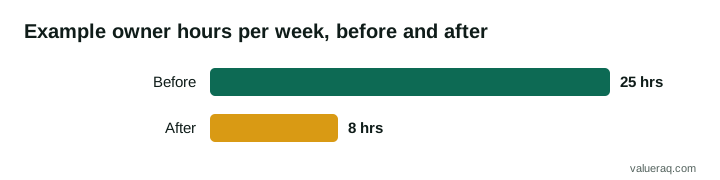
A seller runs a content website with $4,000 a month in net profit and spends about 25 hours a week on it. Everything is in the seller's head. Annual profit, as SDE, is $4,000 × 12 = $48,000.
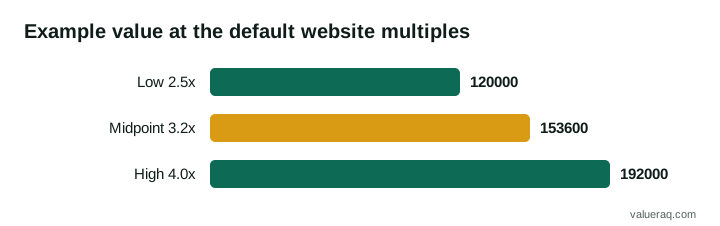
At VALUERAQ's default website range of 2.5 to 4.0 times profit, with a midpoint of 3.2, the arithmetic gives:
| Multiple | Calculation | Value |
|---|---|---|
| Low, 2.5× | $48,000 × 2.5 | $120,000 |
| Midpoint, 3.2× | $48,000 × 3.2 | $153,600 |
| High, 4.0× | $48,000 × 4.0 | $192,000 |
Now suppose the seller spends three weekends writing the seven parts, and a buyer reading them can see that the owner's weekly workload comes down from 25 hours to about 8 once routine tasks are handed to a freelancer using the procedures. That is an illustration, not a promise.
What is that worth? No one can say for sure. But the arithmetic shows how little it takes to matter. Moving the multiple by half a turn, from 2.5 to 3.0, changes the value by $48,000 × 0.5 = $24,000. A buyer who feels a lower handover risk may sit toward the upper part of a range instead of the lower, and a buyer who feels high risk may offer under it. Three weekends of writing is a small cost beside a $24,000 swing, though the actual result will depend on the buyer and the business.
The seller's other gain is speed. A buyer who can read the procedures does not have to ask for them one by one, so due diligence is shorter. BizBuySell's benchmark of 1,661 sold website and ecommerce listings reports a median of 71 days on market, so anything that removes weeks of back-and-forth is worth having.
How to write documentation people will actually use
Good documentation is short and plain. A few habits keep it that way.
- Write for a stranger. Spell out names, tools and the reason for each step. Avoid private shorthand.
- Use checklists, not essays. A numbered list with a "done when" line is easier to follow than a paragraph.
- Show, then tell. A screenshot or a two-minute screen recording beside a typed summary beats either alone.
- Test it. Hand one procedure to a friend or freelancer and watch where they get stuck. Fix those points.
- Date every page. A buyer needs to know it is current.
- Keep it in one folder. One shared folder with a clear order, such as the one in the data room checklist, is easier to hand over than files scattered across devices.
What to share, and when
Not everything goes to every enquirer. Share the business overview early, since it is the least sensitive. Share the task list and traffic summary once a buyer is serious. Share the access inventory, supplier terms and anything with customer details only after a non-disclosure agreement is signed. Credentials move last, at closing. See what documents buyers ask for for the full list.
Common mistakes
- Writing it all in one weekend, then never updating it. A stale document is worse than none, because the buyer follows it and gets it wrong.
- Leaving out the awkward parts. A fragile supplier or a traffic dip is better told by you, with context.
- Hiding behind "it's easy." A task that feels obvious to you is not obvious to a new owner.
- Putting passwords in the document. Use a password manager and hand over at closing.
- Documenting nothing about the first month. The handover plan is what makes the buyer comfortable signing.
A pre-listing checklist
- One-page business overview written
- Every repeating task listed by frequency
- Procedures written for the ten most important tasks
- Access inventory complete, with no passwords in it
- Accounts moved off personal emails where possible
- Supplier and freelancer table finished
- Traffic and customer sources summarized
- Numbers index linked to your proof of revenue
- 90-day handover plan offered, with hours stated
- Everything in one dated, organized folder
When these are done, read how to increase the value of a website before you sell for the next improvements, and how to sell a website for the listing steps.
Frequently asked questions
Do I need to document everything before I list?
No. Start with the overview, the task list, the access inventory and a handover plan. Those four answer most of a buyer's early questions. Add detailed procedures for the tasks that matter most or carry the most risk.
How long does it take to document a small online business?
It depends on how many tasks you do and how tidy your records are. For a small site, many owners can draft the seven parts over a few weekends. Recording short videos as you do each task is often faster than writing.
Will documentation raise my selling price?
It cannot guarantee a higher price. It lowers the buyer's uncertainty, which can help your position in a negotiation, and it shortens due diligence. The final price still depends on profit, history, traffic and the buyer.
Should I share passwords in the documents?
No. List where credentials are stored and hand them over at closing, through a password manager or the platform's own transfer process. Passwords in a shared document are a security risk for both sides.
Can an AI tool or a freelancer write the procedures for me?
You can use either for the first draft, but you must check every step against how the work is really done. A procedure that is wrong is worse than none, so test each one before sharing it.
Sources
- U.S. Small Business Administration, Buy an existing business or franchise.
- BizBuySell, Valuation benchmarks: Websites and ecommerce businesses.
Next step
Once your documents are in order, try the free Website Valuation Tool to see the range a buyer is likely to start from.
Written by VALUERAQ Editorial Team. The VALUERAQ editorial team writes and maintains the platform's guides, methodology and glossary. Every guide is reviewed against the published methodology before publication and when the methodology changes.